🌎 Este sitio también estÑ en español. Ver en español

A second wind
for your old Mac.

Apple stopped updating it. We didn't. Second Wind turns your 2013–2017 Intel Mac into a fast, safe, familiar computer again β€” free and open source.

Public release coming very soon β€” star the repo to be there on day one.

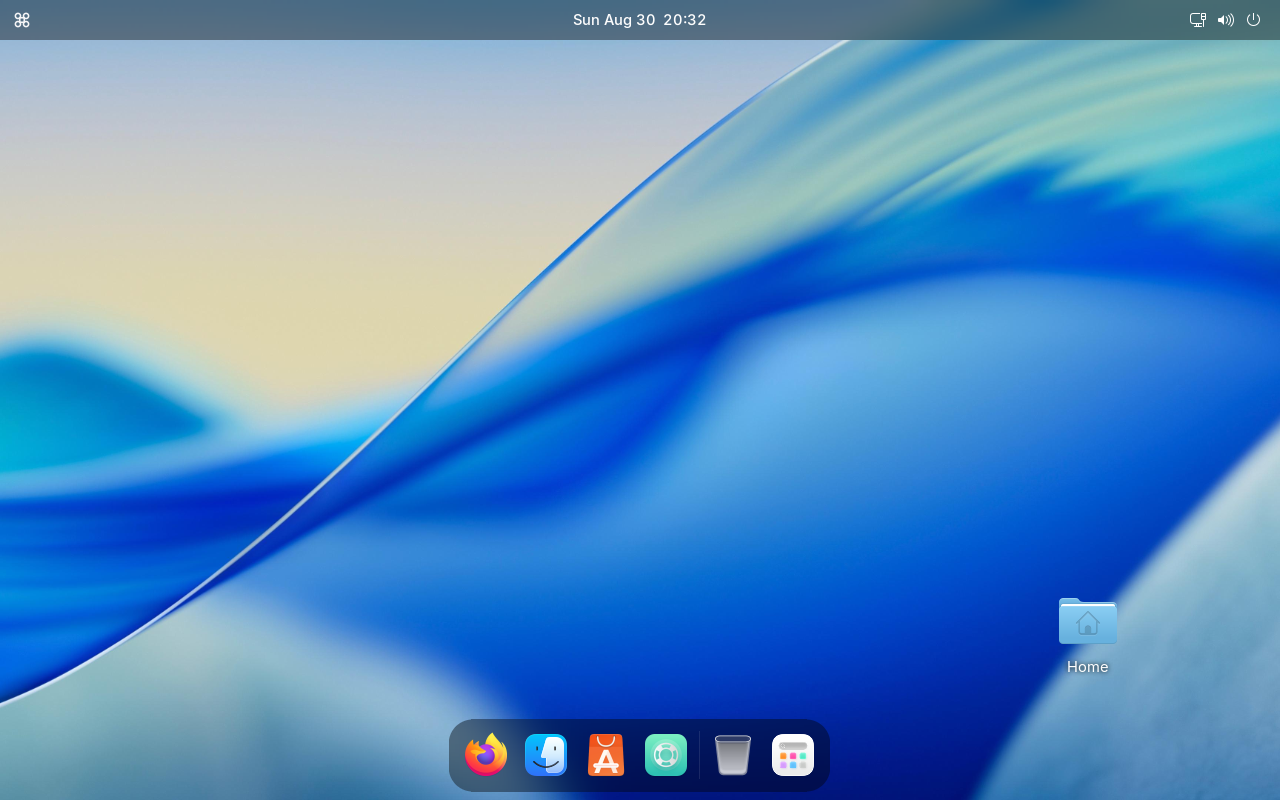
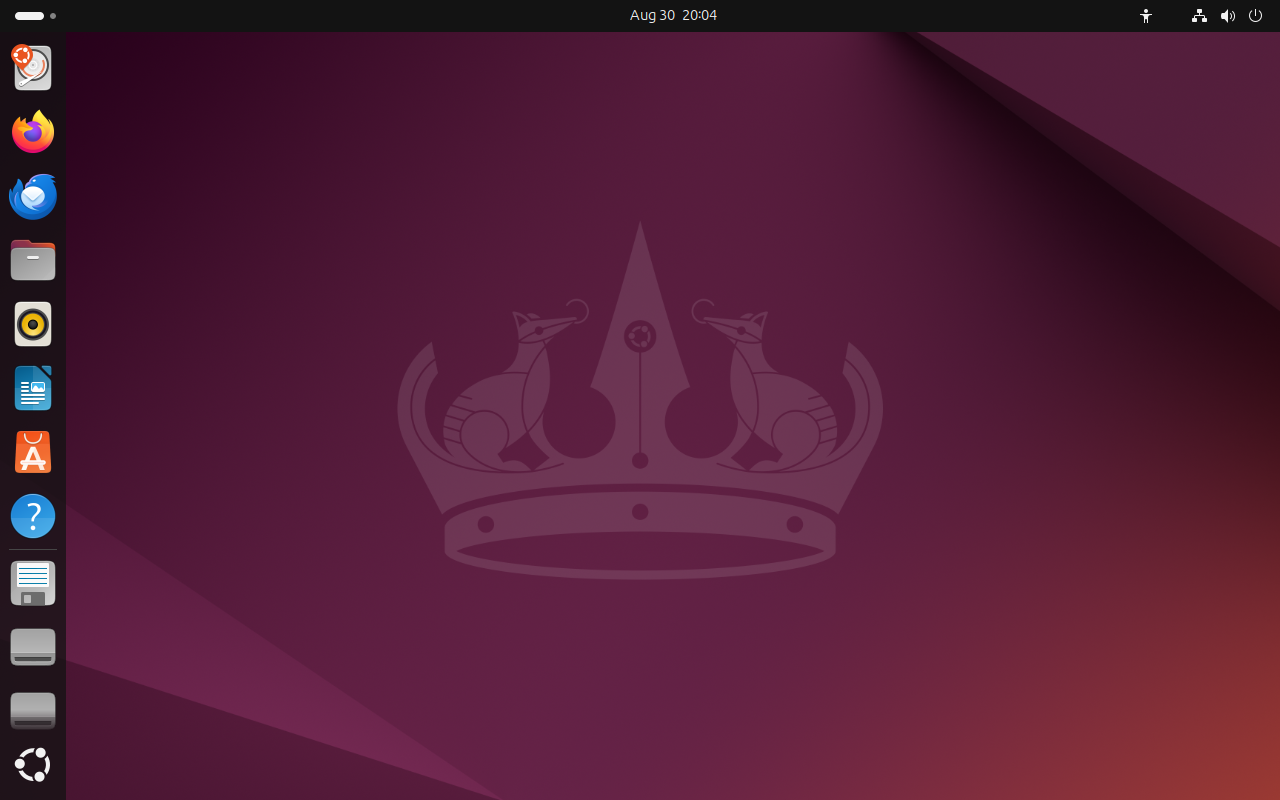
The same Mac, minutes apart β€” drag the handle
The same machine after Second Wind: dock, ⌘ menu, Mac-style theme Stock Ubuntu 24.04 desktop, before Second Wind
Before After Second Wind

Real, unedited screenshots from our automated end-to-end tests: Ubuntu 24.04 exactly as it comes (left), and what Second Wind turns it into (right).

πŸ†“ Free & open source 🚫 Zero telemetry πŸ’» MacBook Air Β· MacBook Pro Β· iMac (2013–2017, Intel) πŸ”’ Every download checksum-verified

Everything your fingers expect. On hardware you already own.

Under the hood it's Ubuntu Linux β€” supported with security updates until 2029. On the surface, it feels like home.

⌘

Your keyboard, the Mac way

⌘C, ⌘V, ⌘Tab, ⌘Space β€” every shortcut stays exactly where your fingers expect it, in every app.

πŸ”

Spotlight search

Tap ⌘ Space and type. Apps, files, calculator β€” instant, just like you're used to.

πŸ–₯️

A familiar face

The dock, the top bar with a ⌘ menu, light & airy typography, a dynamic wallpaper. It looks and moves like a Mac.

πŸ“·

Hardware that just works

FaceTime HD camera, Wi-Fi, fan control, sleep and hibernation β€” set up automatically for your exact model.

πŸ›οΈ

An app store included

21 hand-picked apps β€” browser, WhatsApp, Zoom, office, photos β€” one click each, always from official sources.

πŸ”’

Safe and honest

Open source, every download verified, no telemetry, no ads. Your Mac phones nobody home.

Three steps. Zero terminal.

You never type a command. The installer asks four simple questions and does the rest by itself.

1

Create the USB stick

Use our USB creator on any computer. It downloads the official Ubuntu image and prepares everything.

2

Plug it into your Mac

Turn the Mac on holding the Option (βŒ₯) key and pick the yellow USB drive. That's the hardest part.

3

Answer four questions

Language, keyboard, Wi-Fi, your name. Then go make coffee β€” your Mac comes back reborn.

⚠️ Good to know: Second Wind replaces macOS completely β€” it's designed for Macs that Apple left behind. Back up your files first; the installer warns you clearly before touching the disk.

Will it run on my Mac?

Built for the Intel Macs Apple stopped updating. Find your model β€” the year is on the back of the machine, or in β†’ About This Mac.

Your MacYearsStatus
MacBook Air 11β€³ / 13β€³2013 – 2017βœ“ Ready today
MacBook Pro Retina 13β€³ / 15β€³2013 – 2015βœ“ Ready today
iMac 21.5β€³ / 27β€³2013 – 2015βœ“ Ready today
MacBook Pro 13β€³ / 15β€³ (Touch Bar era)2016 – 2017◐ In progress
Any Mac with Apple T2 chip2018 +β€” Not yet (v2)
Apple Silicon (M1 and later)2020 +β€” Not planned (still supported by Apple)

Full technical matrix, model by model: docs/compatibility.md

Questions people actually ask

Is it really free?

Yes. The installer is open source (MIT) and free forever. Later we'll offer optional paid extras β€” a Mac app that builds the USB for you, priority support β€” but the full experience above costs nothing.

Will I lose macOS and my files?

Yes β€” Second Wind replaces macOS entirely with Ubuntu Linux. It's meant for Macs that no longer receive Apple updates. Back up your files first (the installer reminds you before touching anything).

Is this legal? Is it a hack?

It's not a hack. Second Wind installs Ubuntu, a mainstream free operating system, plus open-source components. Nothing from Apple is copied or redistributed. It's your hardware β€” you're allowed to run what you want on it.

Why not just keep using old macOS?

Without security updates, browsers and banking sites gradually stop working β€” and staying online gets risky. Ubuntu 24.04 receives security updates until 2029, and modern apps (Chrome, WhatsApp, Zoom) run on it today.

I'm not technical. Honestly β€” can I do this?

That's exactly who we built it for. If you can plug in a USB stick and hold down one key, you can do this. You never see a terminal, and every step explains itself in plain language, in English or Spanish.

Can I go back to macOS later?

Yes β€” macOS can be reinstalled from Apple's own recovery (Internet Recovery, ⌘βŒ₯R at power-on) or from a macOS USB stick, on any of these models. Your files must come from your backup.

Give your Mac its second wind.

Don't send a perfectly good machine to a drawer β€” or a landfill.